Tampilkan postingan dengan label Tools. Tampilkan semua postingan

24 Apr 2013

Named String Format in C#

It is nice on how NET Framework gave a bunch of “shortcut” code, including String.Format. But we have to keep track of the indices in the object array which is not really nice.

82653205

It would be good if we just write code, declare a named string collection and format it.

  1. string format = "my name is [[name]] for it called [[name]] to be noted. and address is [[address]].";
  2. Hashtable ht = new Hashtable() { { "name", "Minion No. 10594" }, { "address", "gru's place" } };
  3. txtResult.Text = format.Format(ht);

Now we can use my commonly-used library in rdz.codeplex.com, and use the Format method in StringUtility class. You can download it and use it.

Don’t forget to add reference to Rdz.dll and put using directive as below. You are good to go and the Format function will be available on every string object, like in the example above.

  1. using Rdz.Utility;

In case you didn’t notice, the hashtable is case-sensitive. So to make it case-insensitive, declare Hashtable as below.

  1. Hashtable ht = new Hashtable(StringComparer.CurrentCultureIgnoreCase) { { "name", "Minion No. 10594" }, { "address", "gru's place" } };

Cool! See you! Winking smile

Important Command-Line for Developers

There some bunch of tools which we never know that will help us in our daily operations as developer. But I’ll give you some of that.

Generate Web-Service Proxy Class from WSDL

Generating proxy class from WSDL is important if you want to get data from multiple web services containing exactly the same method. So, in the end you can use the class, set the URL and call the method simultaneously with other URLs.

"C:\Program Files (x86)\Microsoft SDKs\Windows\v7.0A\Bin\WSDL.exe" /out:"<path to cs file>\<cs filename>.cs" /n:<namespace> http://<complete URL to WSDL>/<WebServiceName>.asmx?wsdl

Generate XSD from XML

Generating XSD can be done by using XSD.exe file located in Microsoft SDKs.

"C:\Program Files (x86)\Microsoft SDKs\Windows\v7.0A\Bin\XSD.exe" "<path to xml file>\<xml filename>.xml"

Generate Class from XSD

Generating Class from XSD also useful in many ways. There are 2 type of class, the one which we can use as dataset, and the one just plain class to use to read Xml. So if you want to deserialize an XML and put it on your code, definitely you will need to convert XML to XSD, and XSD to Class.

"C:\Program Files (x86)\Microsoft SDKs\Windows\v7.0A\Bin\XSD.exe" /language:CS /classes /n:<namespace> "<path to XSD file>.xsd"

8 Mar 2013

Xml: Another Way to Use Configuration Options

Many developers believe, a good way to save configuration, can save another line of code. So do I, do not like complicated code to just saving a configuration options for an application that I’ve made. Can’t say how many methods out there to save configuration options, as this is not limited to creativity of each person.

E014584

I do have one way, which is simple enough for me to save any type of configuration with almost any kind of data type. Xml is one of the many options and to do that we just need 2 methods, serialize and deserialize.

16 Feb 2013

Backup-Restore Content of SharePoint 2010 Problems

So, I see a different issues coming up when we try to backup-restore content of SharePoint from one server to another. Most commonly issues that I found is that we will stuck on this message:

“Your backup is from a different version of Microsoft SharePoint Foundation and cannot be restored to a server running the current version. The backup file should be restored to a server with version '4.0.145.0' or later.”

Sometimes it says exact version like above, sometimes with another number of version. To resolve it, there’s more approach that Microsoft has provided.

There are 2 approaches to do a backup-restore of SharePoint content itself:

  1. SharePoint Site Collection backup.
  2. SharePoint Content Database backup.

First approach and always be the best approach (I’ve done this many times never fails):
Make sure both destination and source server have to be the exact same version, both in the SharePoint version or SharePoint build number.

With that approach, both solution can be applied. But of course, sometimes we happen to find a different version both on source or destination for some reason. Again, you could compare both versions, which one is higher. If the source is higher than destination, definitely you can’t just do a backup-restore the content straightaway. You need to make destination at least the same version as source. But if the source is lower than destination, on most cases it will just restored without problem.

But, if you notice my last sentence, that doesn’t mean totally without problem. Say you have SharePoint pre-SP1 as a source, and SharePoint with SP1 as a destination. This scenario can’t be done! But why?

That’s a logical question, because normally if the destination is higher version than source, it’ll do just straightaway, but this is not. The reason behind this is just as simple as this, pre-SP1 and SP1 content database structure has a big change and no backward compatibility.

How we are gonna do this? So, there are 2 approaches.

If you do a content-database backup as I said above, your approach will be easier as 1-2-3:

  1. Attach the pre-SP1 Content Database to an SP1 Farm. This can be done by adding the content database to the specific web application in SharePoint Central Administration.
  2. You have to run SharePoint Configuration Wizard to update the content database to SP1 version. Or if it’s failed, try run PSConfig command to upgrade it (PSConfig.exe -cmd upgrade -inplace b2b -force -cmd applicationcontent -install -cmd installfeatures).
  3. Detach the upgraded Content Database from that SP1 Farm. This can be done by removing the content database from specific web application in SharePoint Central Administration.
  4. Recover content as unattached database by running PowerShell command (Get-SPContentDatabase -ConnectAsUnattachedDatabase  -DatabaseName <DatabaseName> -DatabaseServer <DatabaseServer>).

But if you only “able” to get the site collection backup file from stsadm or PowerShell (because say some companies are restricting us to do a database backup or it has to go with some crazy procedures), here’s what you need to do (which is painful):

  1. Restore pre-SP1 site collection backup file to a new test pre-SP1 farm.
  2. Upgrade the test farm to SP1 until you finished running SharePoint Configuration Wizard.
  3. Perform a site collection backup from test farm.
  4. Perform a site collection restore to destination farm.

Any other way would be:

  1. Restore pre-SP1 site collection backup file to a new test pre-SP1 farm.
  2. Without upgrading, detach Content Database of test pre-SP1 farm.
  3. Attach pre-SP1 Content Database to an SP1 Farm.
  4. Upgrade it by using SharePoint Configuration Wizard or PSConfig as I mentioned above.
  5. Detach the upgraded Content Database.
  6. Recover content as unattached Content Database.

Hope it helps, guys…. Winking smile


reference: http://technet.microsoft.com/en-us/library/hh344831(v=office.14).aspx

24 Jun 2012

Introduction: Microsoft Forefront Identity Manager (FIM) 2010

Guys, there’s something that I want to share to all of you. I wrote this with my style, and hope you enjoy the entire article. I’ll write on next couple posts about Microsoft Forefront Identity Manager (FIM) 2010 from developers perspective. I’m a .NET developer, remember? Of course I will write this from my point of view.

FIM Logo

Microsoft Forefront Identity Manager is a new name for Identity Lifecycle Manager which was officially named as Identity Lifecycle Manager (ILM) 2007. It’s a software specialized for exporting / importing a data from one to another data source. More specific, an attribute to another attribute. If you imagine on a big company that has a couple data source for employees identity, such as Active Directory and Exchange for email and logins, HR systems as employee data, maybe a site portal with such kind of different user data, or plus with telephony system which holds all the extension number of all employees. And they want to put and combine all data from data sources, and deploy to another data source such as Active Directory, they may need this software and you may use this (and sell services) for them. I don’t know exactly the cost for this software, but at next articles, again, I just want to share from .NET developers perspective, not another.

In 2010 version, there’s a big change since Identity Lifecycle Manager in 2007 version. Now, we can export import to a new Management Agent (MA) named FIM Portal. This portal also works as the UI for FIM. We can specify attribute imports and exports, defining rules, creating attributes, change some security so users can also create an identity by accessing this portal. But for FIM Portal, I won’t discuss further, as I still need some exploration on this. Actually it’s pretty “friendly” compared to the console application which is not good for inexperience user like me. But if you missed a configuration, your FIM Portal sync won’t work even you’re already make a good configuration. And there’s a performance consideration using FIM Portal, when you try to sync users more than 5000. It’ll sync an additional object called Detected Rule Entry (DRE) and Expected Rule Entry (ERE) which always will consist more than one per user! But if you use only the console, you won’t get a GUI, not much as friendly as the portal, no expanded functionality, but it’s really easy to configure and to code.

Here’s the list of next article, and it’ll changed to link if I’ve published an article for that title:

  • Forefront Identity Manager - Understand How it Works

  • Forefront Identity Manager - Sync Methods

  • Forefront Identity Manager - Management Agent Configurations

  • Forefront Identity Manager - Creating Custom Management Agent

  • Forefront Identity Manager - Creating Custom Rule Extension

  • Forefront Identity Manager - Creating Custom Password Sync Rule

Guys, at last I’m pretty confident to write this article, and really appreciate your comments. Again, I’m not a system engineer, nor a FIM expert, just a .NET app developer. So sorry if any mistakes on next couple articles, and please do comments for this, so I can make a quick changes if necessary. I also intend to get some quote from some sites including Microsoft.com, and I’ll give it to you at the end of articles.

30 Jan 2012

Simple Scheduled SSIS Package for Import Data

Well, next week will be a brand new workplace for me. This week means rest for me, and I’m happy with it. Anyway, I’ll share to you how to make a simple SQL Server Integration Service package to be scheduled every time. You don’t have to do a code, if your import job is very simple. I’ll show you more on next paragraph.

19 Jan 2012

How to Query SharePoint Web Analytics Reports from SQL Server

This time, I want to show you on how you can query the SharePoint Web Analytics Reports from your SharePoint 2010. It seems that some people still confused because on my previous post, I didn’t give any examples or anything to proof this. I need to apologize, and in this post, I’ll write about how to Query it first, so you can get what I ‘m trying to explain.

24 Nov 2011

Take Screenshot of your Android Devices

How to take a screenshot on Android? A little stupid isn’t it? I’m currently working with Microsoft Products, but my device for daily and mobile email is based on Android. But I think I’m not the only one. Microsoft a little s**ks but I made a money, got a cool job because of their products, and became better understanding in IT Products and lifecycles. Well, as long as it’s an IT tips, I think it’s OK.

Here’s a little tips for you, if you don’t know it. Press and hold Home button and then right away press Power button (see screenshot of Samsung Galaxy Y, with red mark), then you’ll got your screenshot of your Android devices automatically in your SD Card. AFAIK, this will work in Android 2.3 Gingerbread. For Android 2.2 Froyo, AFAIK, may vary, some says that press and hold back button and then right away press Home button.

18 Okt 2011

Tools to Get SPSite and SPWeb Aggregation ID for SharePoint 2010

It’s been a busy months for me, I can’t write anything on my spare time. But I tell you what, I’ve created a little tools to generate Aggregation ID so you don’t have to write code about it if you just want to query the Web Analytics on SharePoint 2010.

Just specify your URL and Level, and you’re good to go.

image

Usage:
Rdz.GetAggregationId.exe –URL <URL of SharePoint Site or SubSite> –Level [SPSite | SPWeb]

Below is the exe file that you can use. It based on .NET 3.5.

UPDATE: Thanks for Anand for noticing. I just realized that I haven’t include the DLL inside the ZIP file yet. Above, is the updated link. Thanks a lot and sorry for my mistake! Open-mouthed smile

8 Jul 2011

Get SharePoint User Profile of Specific User Programmatically

Again, I want to share some of my encapsulated methods. So, I’ve been through so many projects, developing this and that, with the same pattern. It very helpful when you choose to use encapsulation and get it for later use.

This method is about get SharePoint user profile. You can use this code whether you are using SharePoint 2007 or SharePoint 2010. Enjoy… Winking smile

Code Snippet
  1. public static UserProfile GetUserProfile(string LoginName)
  2. {
  3.     return GetUserProfile(SPContext.Current.Site, LoginName);
  4. }
  5. public static UserProfile GetUserProfile(SPSite Site, string LoginName)
  6. {
  7.     return GetUserProfile(Site, LoginName, true);
  8. }
  9. public static UserProfile GetUserProfile(SPSite Site, string LoginName, bool RevertSystemAccount)
  10. {
  11.     //check if SharePoint System Account
  12.     if (IsSharePointSystem(LoginName) && RevertSystemAccount)
  13.         LoginName = Site.WebApplication.ApplicationPool.Username;
  14.     SPUser Usr = Site.RootWeb.EnsureUser(LoginName);
  15.     ServerContext SCtx = ServerContext.GetContext(Site);
  16.     UserProfileManager UPM = new UserProfileManager(SCtx);
  17.     if (UPM.UserExists(Usr.LoginName)) { return UPM.GetUserProfile(Usr.LoginName); }
  18.     else return null;
  19. }

Write and Delete Settings to .NET App.Config or Web.Config

I don’t have anything to post Where, but I think this might be useful for you. Want to write and delete appSettings in App.Config or Web.Config? Sure you do know how to read it.

Hope this little code helps

Code Snippet
  1. namespace Rdz.Utility
  2. {
  3.     public static class ConfigUtility
  4.     {
  5.         /// <summary>
  6.         /// Writes to configuration file (App.Config) to specified key, or creates a new Key if doesn't exist
  7.         /// </summary>
  8.         /// <param name="KeyName">The Application Settings KeyName</param>
  9.         /// <param name="Value">The Application Settings Value</param>
  10.         public static void WriteToAppConfig(string KeyName, string Value)
  11.         {
  12.             Configuration cfg = ConfigurationManager.OpenExeConfiguration(ConfigurationUserLevel.None);
  13.             if (cfg.AppSettings.Settings.AllKeys.Contains(KeyName))
  14.                 cfg.AppSettings.Settings[KeyName].Value = Value;
  15.             else
  16.                 cfg.AppSettings.Settings.Add(KeyName, Value);
  17.             cfg.Save(ConfigurationSaveMode.Modified);
  18.             ConfigurationManager.RefreshSection("appSettings");
  19.         }
  20.  
  21.         /// <summary>
  22.         /// Deletes specified key in app.config
  23.         /// </summary>
  24.         /// <param name="KeyName"></param>
  25.         public static void DeleteAppConfig(string KeyName)
  26.         {
  27.             Configuration cfg = ConfigurationManager.OpenExeConfiguration(ConfigurationUserLevel.None);
  28.             if (cfg.AppSettings.Settings.AllKeys.Contains(KeyName))
  29.             {
  30.                 cfg.AppSettings.Settings.Remove(KeyName);
  31.                 cfg.Save(ConfigurationSaveMode.Modified);
  32.             }
  33.             ConfigurationManager.RefreshSection("appSettings");
  34.         }
  35.     }
  36. }

Cheers… and happy coding! Hihi...

9 Jun 2011

Add OOTB Rating Control in SharePoint 2010 Blog Site

Again, this is really bad I think Confused smile. Rating Control doesn’t exist in Blog template site in SharePoint 2010, even if you have activated Rating feature in Posts list. I think there’s a good solution out there in internet, but I have a different one. It’s not the best solution I think, but can be comparable. The easy way, but good enough.

6 Jun 2011

My Development Environment to Develop SharePoint 2010 Solutions

Well, I don’t know if this tips would help much for you. But this is my best Development Environment when I want to create SharePoint 2010 Solutions. And I’m about to share to you all, so I hope it helps.

My Development Environment (DE) is using Windows 2008 R2. But I’m adding some UI feature for extra comfort usability, and more like Windows 7, and of course, Kung Fu Panda 2 themes, downloaded from Microsoft’s theme pack website Smile with tongue out. And not only that! I want my development environment works faster, faster to deploy (well, at the first deploy, you can’t refuse if it slower, but better on next deployment), faster to install DLL, and recycle IIS, and faster to debug IIS processes.

Recycle IIS Application using Command Line

I’m actually don’t know if there’s an application which can recycle IIS Application Pool using command line, but I haven’t found one. So, I would like to create this small app.

And, here’s the screenshot.
image

image

image

I hope the app could help you all. It’s based on .NET Framework 2.0 (CMIIW Smile with tongue out). And I’m sure it’ll comin’ handy.
Here’s the link, enjoy.

Tips: Set Default SharePoint Content Database in Web Application

This day I would like to write a small tips, simple but useful tips to maintain your SharePoint Database growth. Basically, when you create a web application, you must configure the Web Application, the SQL Database name for Default Content Database. For a serious disk space matter, if in your web application in the next implementation will be used as Document Center, or anything else which needs a big space, you might want to separate your Default Content Database for each Site Collections.

You could have multiple Content Database, but you don’t know what is the default Content Database if you create a Site Collection. Well, I think this is not the trick, but a small tips and feature that you sometimes doesn’t realize it exist.

8 Des 2010

Write Windows Event Log using Command Line

Last week I’ve created this small application using VS 2010, targeted to Microsoft.NET Framework 3.5. It’s a small application with simple code, but it’s very useful to Log your message to Windows Event Log in a DOS Batch file environment.

Click to download EventLogger.exe

It’s very simple to use. See the example below.

image 
To create an event log entry with “Error” flag.

image
To create an event log entry with “Warning” flag.

image 
To create an event log entry with “Information” flag.

SharePoint Open in Windows Explorer Too Slow?

When you try to open SharePoint Library with Open in Windows Explorer feature, sometimes we feel that the process are too slow. This thing is really really frustrating and annoying if you work with bigger files, maybe more than 100 MBs. I’ve found in the internet, couldn’t remember the links, but this is the tips, just turn off the “Automatically detect settings” in LAN Settings in Internet Options. What??? What is that? Here’s the short instructions (for you who don’t know where it is) …

  1. Open your Internet Explorer or Open your Control Panel
  2. Open Internet Options (in Control Panel). From Internet Explorer, you need to browse to the Tools menu before you see Internet Options menu.
  3. Open Connections tab, and click LAN Settings.
  4. Uncheck the Automatically detect settings. Click OK.
  5. You’ve done your job.

20 Okt 2010

Advanced Download Flash Video Streaming using Fiddler2

Fiddler2 is web debugging tools that you can use to view Request or Response Header, and you can create your own Response or Request Header. But what if you want to use it for fun, not just debugging web? You can use Fiddler2 to download Flash Video Streaming! I haven’t tested it yet on YouTube but DailyMotion.com works just fine. Just download Fiddler2 from their website, find it on Google or you can go through this link http://www.fiddler2.com/fiddler2/.

image

How to use it? Follow these steps to download Flash Video Streaming…

image

Run “Fiddler2”

image

image

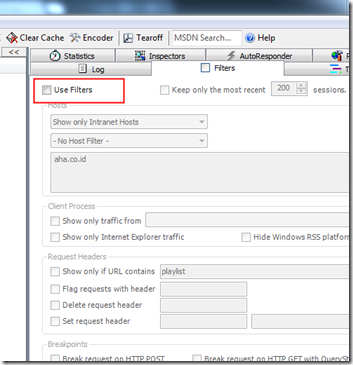
Click “Filters” tab to set filter, and check the “Use Filters” checkbox.

image

Give checkmark to this field under “Request Header”, and set the textbox to “.flv” or any Flash Video Extension which you want to download. You can give any other filters to make the session result better, like “Show only Internet Explorer traffic”.

image

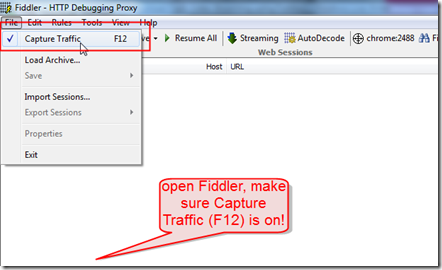
Make sure that “File” > “Capture Traffic” is checked.

image

Open IE and start browsing to stream the Flash Video. When you finally find your video, open it and stream it through IE.

image

Back to Fiddler2, you can see 2 session opened.

image

image

You can try copy the URL and paste it to Download Manager. You can try to “Query Size” if you using Free Download Manager.

image

If the size is reasonable for video, you can directly click OK to download the file. Otherwise, see another session captured in Fiddler2, and copy the URL, and you can just Query the size.

Note that you can use Fiddler2 to get the URL and download it via download manager.


UPDATE:

image

Note, that you can download any video from other site with this configuration Filters in Fiddler2:

  1. DailyMotion.com, try to change the text with “.mp4” or “.flv”.
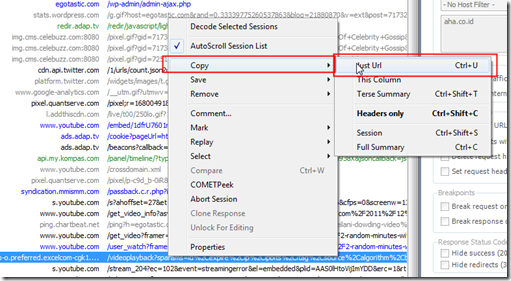
  2. Youtube.com, try to look at the text with “/videoplayback?”. To verify if it’s the video or not, click first in the session opened in Fiddler, and click “Inspectors” tab. On the Response Headers section, see the Content-Type, usually “video/x-flv”.

UPDATE (AGAIN Smile with tongue out):

There’s an incoming problem from Anonymous, he/she needs to download a video from a website, in http://egotastic.com/2011/12/2-random-minutes-with-leilani-dowding-video/. Let’s take a look at the pictures below, image will tells you much….Rolling on the floor laughing

image

image

image

Make sure no filters attached

image

Refresh again the page, and play the video it again, to capture all HTML Traffic…. Captured, and that’s it, find the /videoplayback? URL, and I found it!
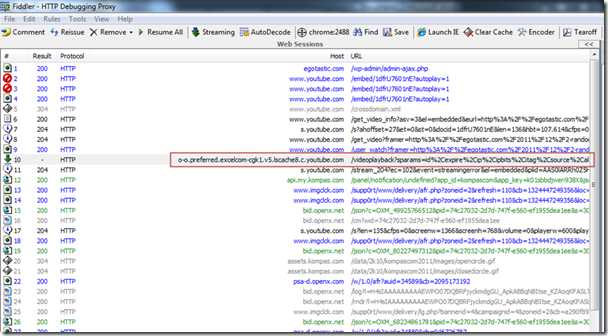
image

To make sure it’s the video, look at the Inspector tab, look at Response Headers, the content type is video/flv or video/x-flv.
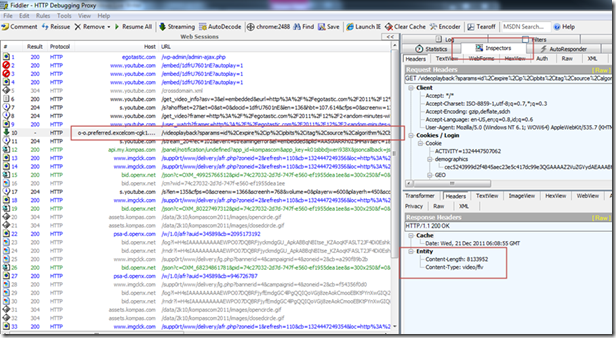
image

Right click on that response, and Copy the URL
image

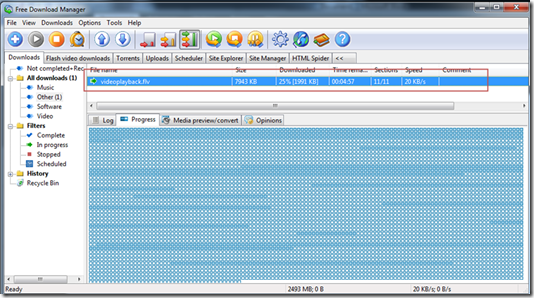
Paste it on your favorite download manager, mine is Free Download Manager, and start downloading…
image

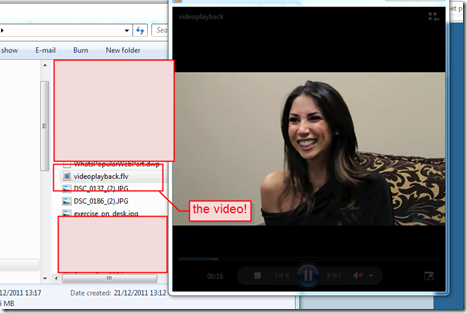
And if finished, look at your saved videos…. voila!
image

19 Okt 2010

Impersonate Active Directory Account when Connecting to Database using Windows Authentication

Lately I have a little problem, not a major but I’m not comfortable and must get to used to it. Suppose we want to connect to another SQL Server Database, and we don’t have any options except use the WINDOWS Authentication. But frankly, this SQL Server which we want to connect to is in another domain. Yeah, you could try to use Windows Authentication, but the User name field and Password field are grayed out. For example, my notebook wasn’t joined to another domain (with logged on user is RADIT\raditz), and I need to connect to another SQL Server in a different domain (suppose another domain user to connect to is CONTOSO\admin), use the following command-line:

RUNAS /user:CONTOSO\admin /netonly “<the SQL Management Studio exe path>”

RUNAS /user:CONTOSO\admin /netonly “D:\Program Files\Microsoft SQL Server\100\Tools\Binn\VSShell\Common7\IDE\Ssms.exe”

image

You’ll be asked for the password, and the application will running with that user accounts.

image

Don’t worry, just insert the SQL Server Name, and click Connect.

16 Okt 2010

Remove HTML Tags when Obtaining Text from SharePoint Field

This is one of simple trick to use when you start to develop SharePoint Web Parts. When you want to get the text of, let’s say “Page Content” field of Pages Library, or any other formatted text field in HTML, and you want to get it without the formatting, then here we go the trick.

You can use SPHttpUtility.ConvertSimpleHtmlToText, with 2 arguments, the HTML formatted text, and the maximum length. And you can use other SPHttpUtility objects or any objects in Microsoft.SharePoint.Utilities to do another tricks. You don’t need to get any further code to get this and that, just point to Microsoft.SharePoint.Utilities, and you’ll get the tricks.