15 Feb 2012

Forefront Identity Manager Service Failed to Start in SharePoint 2010

Did you ever got this when restarting your SharePoint 2010 machine?
image

Too bad that this thing is always happening every time you restart your SharePoint 2010 machine. Got the answer from a buddy in internet (thanks Michael Hanes, this is really helping me a lot!). I got to tell you, this thing happens after I’ve upgraded my SharePoint development box to Service Pack 1.

This is the simple fix, I hope you’ll find this thing helpful to you by looking at the series of images below. Please ask me anything if it not clear to you. Thanks! Winking smile

30 Jan 2012

Simple Scheduled SSIS Package for Import Data

Well, next week will be a brand new workplace for me. This week means rest for me, and I’m happy with it. Anyway, I’ll share to you how to make a simple SQL Server Integration Service package to be scheduled every time. You don’t have to do a code, if your import job is very simple. I’ll show you more on next paragraph.

26 Jan 2012

Windows Live Writer is the Best Blog Writer!

You guys actually have your favorite blog writer application, or even don’t use it (only use the web version of Blogspot or Wordpress or whatever blog you’ve used). I have one my favorite, Windows Live Writer. My client installed with Windows Live Writer 2011.
image
So, what’s the feature so far? Let’s take a look!

Problems in SharePoint 2010, “The service was unable to start because the version of the database does not match the version of the product.”

Lately, I’ve updated my SharePoint 2010 development engine to SharePoint 2010 Service Pack 1, and after updating SharePoint 2010 to Service Pack 1, and starting all services, there’s one service won’t run, Forefront Identity Manager Synchronization Service. When looked at the Event Viewer log, it says The service was unable to start because the version of the database does not match the version of the product.

19 Jan 2012

How to Query SharePoint Web Analytics Reports from SQL Server

This time, I want to show you on how you can query the SharePoint Web Analytics Reports from your SharePoint 2010. It seems that some people still confused because on my previous post, I didn’t give any examples or anything to proof this. I need to apologize, and in this post, I’ll write about how to Query it first, so you can get what I ‘m trying to explain.

2 Des 2011

Tips: Simplify your ‘OR’ Logic in C#.NET

I think I do have a little tips for you to share. Not very significant tips, but you can use it for your daily practice.

Sometimes when you want to use a logic like this, it’s too long to write code.

Old Code
  1. if (Fld.Type == SPFieldType.Choice || Fld.Type == SPFieldType.Note || Fld.Type == SPFieldType.Integer || Fld.Type == SPFieldType.Number)
  2.     FieldContent = (string)Li[Fld.Id];

But you can simplify your code using this code below.

Simpler Code
  1. if (",Text,Note,Choice,Integer,Number,".Contains(Fld.TypeAsString))
  2.     FieldContent = (string)Li[Fld.Id];

Happy coding…! Winking smile

24 Nov 2011

Take Screenshot of your Android Devices

How to take a screenshot on Android? A little stupid isn’t it? I’m currently working with Microsoft Products, but my device for daily and mobile email is based on Android. But I think I’m not the only one. Microsoft a little s**ks but I made a money, got a cool job because of their products, and became better understanding in IT Products and lifecycles. Well, as long as it’s an IT tips, I think it’s OK.

Here’s a little tips for you, if you don’t know it. Press and hold Home button and then right away press Power button (see screenshot of Samsung Galaxy Y, with red mark), then you’ll got your screenshot of your Android devices automatically in your SD Card. AFAIK, this will work in Android 2.3 Gingerbread. For Android 2.2 Froyo, AFAIK, may vary, some says that press and hold back button and then right away press Home button.

21 Okt 2011

Get All Items including inside SharePoint Folder Programmatically using SPQuery

Just sharing the knowledge, I want to share about how to get all items / documents programmatically without getting inside the folder and querying it again. So, without folders, all items whether inside a folder or not, will be shown upon your query result.

Awwww, I’m not in Windows 2008 mode to copy my code in here and show some screenshots, but that’s just fine.

Using RecursiveAll in SPQuery
  1. SPQuery Q = new SPQuery();
  2. Q.Query = "<Where><Eq><FieldRef Name='Title' /><Value Type='Text'>BOOK</Value></Eq></Where>";
  3. Q.ViewFields = "<FieldRef Name='Name' /><FieldRef Name='ID' />";
  4. Q.ViewAttributes = "Scope='RecursiveAll'";

After you code your query, then you can add ViewAttributes and add Scope=’RecursiveAll’ to the SPQuery object.

Done, and all items whether inside a folder or not, will be shown upon your query result.

18 Okt 2011

Tools to Get SPSite and SPWeb Aggregation ID for SharePoint 2010

It’s been a busy months for me, I can’t write anything on my spare time. But I tell you what, I’ve created a little tools to generate Aggregation ID so you don’t have to write code about it if you just want to query the Web Analytics on SharePoint 2010.

Just specify your URL and Level, and you’re good to go.

image

Usage:
Rdz.GetAggregationId.exe –URL <URL of SharePoint Site or SubSite> –Level [SPSite | SPWeb]

Below is the exe file that you can use. It based on .NET 3.5.

UPDATE: Thanks for Anand for noticing. I just realized that I haven’t include the DLL inside the ZIP file yet. Above, is the updated link. Thanks a lot and sorry for my mistake! Open-mouthed smile

20 Jul 2011

Tips for Different FQDN and NetBIOSName in SharePoint 2010 User Profiles

SharePoint, SharePoint, and SharePoint again. Today I want to post something about how we can import from Active Directory but with the FQDN and NetBIOSName completely different. If your domain FQDN is (for example) gembelcorpse.co.id, and your NetBIOS Name set to GC, then you do have a problem. When you let this SharePoint User Profile imports from your active directory, it will make the User Profile import like GEMBELCORPSE\administrator, or GEMBELCORPSE\user1, and that’s totally wrong.

In the previous version of SharePoint (2007), we don’t need to do this tips, all things are automatically done by system. Now, in SharePoint 2010, we must do this kind of tips. So, take a look at this PowerShell code.

Code Snippet
  1. param($ServiceApplicationName)
  2. $ServiceApps = Get-SPServiceApplication
  3. $UserProfileServiceApp = ""
  4. foreach ($sa in $ServiceApps)
  5.   {if ($sa.DisplayName -eq $ServiceApplicationName)
  6.     {$UserProfileServiceApp = $sa}
  7.   }
  8. if ($UserProfileServiceApp -eq "")
  9. {
  10.     Write-Host "Ooops..., Service Application '$($ServiceApplicationName)' not found."
  11. }
  12. else
  13. {
  14.     Write-Host "Found '$($UserProfileServiceApp.DisplayName)'..."
  15.     if ($UserProfileServiceApp.NetBIOSDomainNamesEnabled -eq 1)
  16.     {
  17.         Write-Host "NetBIOSDomainNamesEnabled in '$($UserProfileServiceApp.DisplayName)' already enabled, nothings updated!"
  18.     }
  19.     else
  20.     {
  21.         Write-Host "Press any key to continue, [Esc] to cancel..."
  22.         $Key = $Host.UI.RawUI.ReadKey("NoEcho,IncludeKeyDown")
  23.         if ([int]$Key.Character -eq 27)
  24.         {
  25.             Write-Host "Canceling update to '$($UserProfileServiceApp.DisplayName)'..."
  26.         }
  27.         else
  28.         {
  29.             $UserProfileServiceApp.NetBIOSDomainNamesEnabled = 1
  30.             $UserProfileServiceApp.Update()
  31.             Write-Host "Done Updating '$($UserProfileServiceApp.DisplayName)'!"
  32.             Write-Host "Please run Full Synchronization to import all User Profile."
  33.         }
  34.     }
  35. }

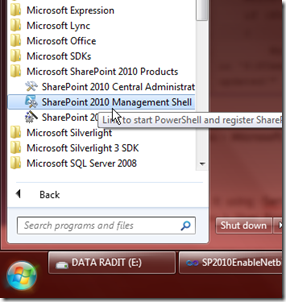
With that PowerShell code, run it using SharePoint PowerShell, you can run it from Start menu > Microsoft SharePoint 2010 Products > SharePoint 2010 Management Shell.
image

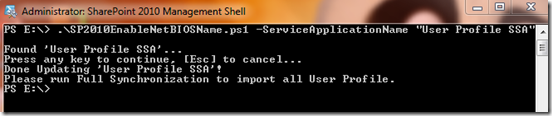
Run it using –ServiceApplicationName argument. If your User Profile Service Application Name is User Profile SSA, then you should run it like this command below.
.\SP2010EnableNetBIOSName.ps1 -ServiceApplicationName "User Profile SSA"
image

NOTE: You must run this script on a newly created User Profile Service Application. If you already have the existing, you must delete it, or create another User Profile Service Application. Don’t do the Full Synchronization, configure it first (point to active directory), and then run this script, and then run the Full Synchronization of your User Profile Service Application.

Nice….! click +1 if you do like Winking smile