24 Nov 2011

Take Screenshot of your Android Devices

How to take a screenshot on Android? A little stupid isn’t it? I’m currently working with Microsoft Products, but my device for daily and mobile email is based on Android. But I think I’m not the only one. Microsoft a little s**ks but I made a money, got a cool job because of their products, and became better understanding in IT Products and lifecycles. Well, as long as it’s an IT tips, I think it’s OK.

Here’s a little tips for you, if you don’t know it. Press and hold Home button and then right away press Power button (see screenshot of Samsung Galaxy Y, with red mark), then you’ll got your screenshot of your Android devices automatically in your SD Card. AFAIK, this will work in Android 2.3 Gingerbread. For Android 2.2 Froyo, AFAIK, may vary, some says that press and hold back button and then right away press Home button.

21 Okt 2011

Get All Items including inside SharePoint Folder Programmatically using SPQuery

Just sharing the knowledge, I want to share about how to get all items / documents programmatically without getting inside the folder and querying it again. So, without folders, all items whether inside a folder or not, will be shown upon your query result.

Awwww, I’m not in Windows 2008 mode to copy my code in here and show some screenshots, but that’s just fine.

Using RecursiveAll in SPQuery
  1. SPQuery Q = new SPQuery();
  2. Q.Query = "<Where><Eq><FieldRef Name='Title' /><Value Type='Text'>BOOK</Value></Eq></Where>";
  3. Q.ViewFields = "<FieldRef Name='Name' /><FieldRef Name='ID' />";
  4. Q.ViewAttributes = "Scope='RecursiveAll'";

After you code your query, then you can add ViewAttributes and add Scope=’RecursiveAll’ to the SPQuery object.

Done, and all items whether inside a folder or not, will be shown upon your query result.

18 Okt 2011

Tools to Get SPSite and SPWeb Aggregation ID for SharePoint 2010

It’s been a busy months for me, I can’t write anything on my spare time. But I tell you what, I’ve created a little tools to generate Aggregation ID so you don’t have to write code about it if you just want to query the Web Analytics on SharePoint 2010.

Just specify your URL and Level, and you’re good to go.

image

Usage:
Rdz.GetAggregationId.exe –URL <URL of SharePoint Site or SubSite> –Level [SPSite | SPWeb]

Below is the exe file that you can use. It based on .NET 3.5.

UPDATE: Thanks for Anand for noticing. I just realized that I haven’t include the DLL inside the ZIP file yet. Above, is the updated link. Thanks a lot and sorry for my mistake! Open-mouthed smile

20 Jul 2011

Tips for Different FQDN and NetBIOSName in SharePoint 2010 User Profiles

SharePoint, SharePoint, and SharePoint again. Today I want to post something about how we can import from Active Directory but with the FQDN and NetBIOSName completely different. If your domain FQDN is (for example) gembelcorpse.co.id, and your NetBIOS Name set to GC, then you do have a problem. When you let this SharePoint User Profile imports from your active directory, it will make the User Profile import like GEMBELCORPSE\administrator, or GEMBELCORPSE\user1, and that’s totally wrong.

In the previous version of SharePoint (2007), we don’t need to do this tips, all things are automatically done by system. Now, in SharePoint 2010, we must do this kind of tips. So, take a look at this PowerShell code.

Code Snippet
  1. param($ServiceApplicationName)
  2. $ServiceApps = Get-SPServiceApplication
  3. $UserProfileServiceApp = ""
  4. foreach ($sa in $ServiceApps)
  5.   {if ($sa.DisplayName -eq $ServiceApplicationName)
  6.     {$UserProfileServiceApp = $sa}
  7.   }
  8. if ($UserProfileServiceApp -eq "")
  9. {
  10.     Write-Host "Ooops..., Service Application '$($ServiceApplicationName)' not found."
  11. }
  12. else
  13. {
  14.     Write-Host "Found '$($UserProfileServiceApp.DisplayName)'..."
  15.     if ($UserProfileServiceApp.NetBIOSDomainNamesEnabled -eq 1)
  16.     {
  17.         Write-Host "NetBIOSDomainNamesEnabled in '$($UserProfileServiceApp.DisplayName)' already enabled, nothings updated!"
  18.     }
  19.     else
  20.     {
  21.         Write-Host "Press any key to continue, [Esc] to cancel..."
  22.         $Key = $Host.UI.RawUI.ReadKey("NoEcho,IncludeKeyDown")
  23.         if ([int]$Key.Character -eq 27)
  24.         {
  25.             Write-Host "Canceling update to '$($UserProfileServiceApp.DisplayName)'..."
  26.         }
  27.         else
  28.         {
  29.             $UserProfileServiceApp.NetBIOSDomainNamesEnabled = 1
  30.             $UserProfileServiceApp.Update()
  31.             Write-Host "Done Updating '$($UserProfileServiceApp.DisplayName)'!"
  32.             Write-Host "Please run Full Synchronization to import all User Profile."
  33.         }
  34.     }
  35. }

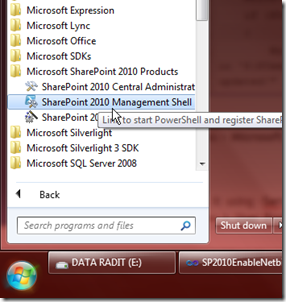
With that PowerShell code, run it using SharePoint PowerShell, you can run it from Start menu > Microsoft SharePoint 2010 Products > SharePoint 2010 Management Shell.
image

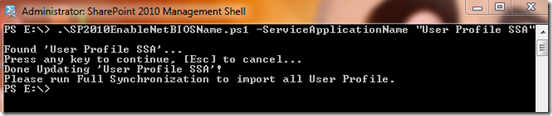
Run it using –ServiceApplicationName argument. If your User Profile Service Application Name is User Profile SSA, then you should run it like this command below.
.\SP2010EnableNetBIOSName.ps1 -ServiceApplicationName "User Profile SSA"
image

NOTE: You must run this script on a newly created User Profile Service Application. If you already have the existing, you must delete it, or create another User Profile Service Application. Don’t do the Full Synchronization, configure it first (point to active directory), and then run this script, and then run the Full Synchronization of your User Profile Service Application.

Nice….! click +1 if you do like Winking smile

8 Jul 2011

Get SharePoint User Profile of Specific User Programmatically

Again, I want to share some of my encapsulated methods. So, I’ve been through so many projects, developing this and that, with the same pattern. It very helpful when you choose to use encapsulation and get it for later use.

This method is about get SharePoint user profile. You can use this code whether you are using SharePoint 2007 or SharePoint 2010. Enjoy… Winking smile

Code Snippet
  1. public static UserProfile GetUserProfile(string LoginName)
  2. {
  3.     return GetUserProfile(SPContext.Current.Site, LoginName);
  4. }
  5. public static UserProfile GetUserProfile(SPSite Site, string LoginName)
  6. {
  7.     return GetUserProfile(Site, LoginName, true);
  8. }
  9. public static UserProfile GetUserProfile(SPSite Site, string LoginName, bool RevertSystemAccount)
  10. {
  11.     //check if SharePoint System Account
  12.     if (IsSharePointSystem(LoginName) && RevertSystemAccount)
  13.         LoginName = Site.WebApplication.ApplicationPool.Username;
  14.     SPUser Usr = Site.RootWeb.EnsureUser(LoginName);
  15.     ServerContext SCtx = ServerContext.GetContext(Site);
  16.     UserProfileManager UPM = new UserProfileManager(SCtx);
  17.     if (UPM.UserExists(Usr.LoginName)) { return UPM.GetUserProfile(Usr.LoginName); }
  18.     else return null;
  19. }

Write and Delete Settings to .NET App.Config or Web.Config

I don’t have anything to post Where, but I think this might be useful for you. Want to write and delete appSettings in App.Config or Web.Config? Sure you do know how to read it.

Hope this little code helps

Code Snippet
  1. namespace Rdz.Utility
  2. {
  3.     public static class ConfigUtility
  4.     {
  5.         /// <summary>
  6.         /// Writes to configuration file (App.Config) to specified key, or creates a new Key if doesn't exist
  7.         /// </summary>
  8.         /// <param name="KeyName">The Application Settings KeyName</param>
  9.         /// <param name="Value">The Application Settings Value</param>
  10.         public static void WriteToAppConfig(string KeyName, string Value)
  11.         {
  12.             Configuration cfg = ConfigurationManager.OpenExeConfiguration(ConfigurationUserLevel.None);
  13.             if (cfg.AppSettings.Settings.AllKeys.Contains(KeyName))
  14.                 cfg.AppSettings.Settings[KeyName].Value = Value;
  15.             else
  16.                 cfg.AppSettings.Settings.Add(KeyName, Value);
  17.             cfg.Save(ConfigurationSaveMode.Modified);
  18.             ConfigurationManager.RefreshSection("appSettings");
  19.         }
  20.  
  21.         /// <summary>
  22.         /// Deletes specified key in app.config
  23.         /// </summary>
  24.         /// <param name="KeyName"></param>
  25.         public static void DeleteAppConfig(string KeyName)
  26.         {
  27.             Configuration cfg = ConfigurationManager.OpenExeConfiguration(ConfigurationUserLevel.None);
  28.             if (cfg.AppSettings.Settings.AllKeys.Contains(KeyName))
  29.             {
  30.                 cfg.AppSettings.Settings.Remove(KeyName);
  31.                 cfg.Save(ConfigurationSaveMode.Modified);
  32.             }
  33.             ConfigurationManager.RefreshSection("appSettings");
  34.         }
  35.     }
  36. }

Cheers… and happy coding! Hihi...

9 Jun 2011

Add OOTB Rating Control in SharePoint 2010 Blog Site

Again, this is really bad I think Confused smile. Rating Control doesn’t exist in Blog template site in SharePoint 2010, even if you have activated Rating feature in Posts list. I think there’s a good solution out there in internet, but I have a different one. It’s not the best solution I think, but can be comparable. The easy way, but good enough.

6 Jun 2011

My Development Environment to Develop SharePoint 2010 Solutions

Well, I don’t know if this tips would help much for you. But this is my best Development Environment when I want to create SharePoint 2010 Solutions. And I’m about to share to you all, so I hope it helps.

My Development Environment (DE) is using Windows 2008 R2. But I’m adding some UI feature for extra comfort usability, and more like Windows 7, and of course, Kung Fu Panda 2 themes, downloaded from Microsoft’s theme pack website Smile with tongue out. And not only that! I want my development environment works faster, faster to deploy (well, at the first deploy, you can’t refuse if it slower, but better on next deployment), faster to install DLL, and recycle IIS, and faster to debug IIS processes.

Recycle IIS Application using Command Line

I’m actually don’t know if there’s an application which can recycle IIS Application Pool using command line, but I haven’t found one. So, I would like to create this small app.

And, here’s the screenshot.
image

image

image

I hope the app could help you all. It’s based on .NET Framework 2.0 (CMIIW Smile with tongue out). And I’m sure it’ll comin’ handy.
Here’s the link, enjoy.

Tips: Set Default SharePoint Content Database in Web Application

This day I would like to write a small tips, simple but useful tips to maintain your SharePoint Database growth. Basically, when you create a web application, you must configure the Web Application, the SQL Database name for Default Content Database. For a serious disk space matter, if in your web application in the next implementation will be used as Document Center, or anything else which needs a big space, you might want to separate your Default Content Database for each Site Collections.

You could have multiple Content Database, but you don’t know what is the default Content Database if you create a Site Collection. Well, I think this is not the trick, but a small tips and feature that you sometimes doesn’t realize it exist.